Account Surcharges - iGo
Configuring Cost Surcharges for Aggregator Accounts.
Aggregators may send their price via integration. For these accounts, prices are calculated and supplied directly by the aggregator.

Please contact the aggregator if you require clarification on their rates or pricing structure.
The same cost and price will be applied to all jobs through this account, and will be locked, as such we will need to set a negative cost surcharge on this account if required.
You can also adjust your cost within Dockets Checks & Posting manually once the journey has been completed if required.
Under 365 Accounts.
Navigate to Accounts > Corporate Accounts - Type the aggregator name in the search box.
Double Click to open the Account for configuration > Navigate to the Tariffs Tab in the top bar.
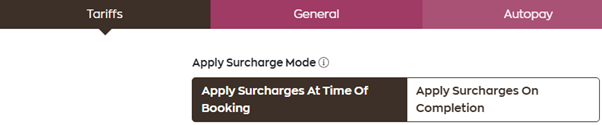
Ensure the Surcharge mode is applied at the Time of Booking.
On the same tab, Scroll down to Surcharge (Cost) on the right side.
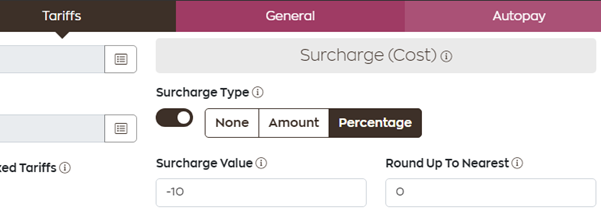
You can configure a percentage or a flat amount, please add a - negative value here as the Price and Cost will be the same on these jobs.
Adding a -100 percentage will hide the Cost on these bookings, you will have to adjust this on your dockets / driver sheets.
Surcharge Type - Percentage
Surcharge Value -10
For a -10% Cost per job.
Make sure to Save.

Ensure the Surcharge mode is applied at the Time of Booking.
On the same tab, Scroll down to Surcharge (Cost) on the right side.
You can configure a percentage or a flat amount, please add a - negative value here as the Price and Cost will be the same on these jobs.
Adding a -100 percentage will hide the Cost on these bookings, you will have to adjust this on your dockets / driver sheets.
Surcharge Type - Percentage
Surcharge Value -10
For a -10% Cost per job.
Make sure to Save.

Please do not adjust anything else on this account as it can compromise the integration.