How to accept or reject a job - DC+ (Beta)

Driver Companion+ is currently in beta. You may encounter bugs, and features and behaviour may change as improvements and updates are made.
How to accept a job
Tap Accept or swipe to the right (depending on your job view preference) to take the job.

Once accepted the job will be assigned to you.
Once accepted the job will be assigned to you.
How to reject a job
Tap the 'X' in the top-right corner to reject the job offer. If the timer runs out, the job offer is automatically rejected.
There may be a penalty for rejecting a job.
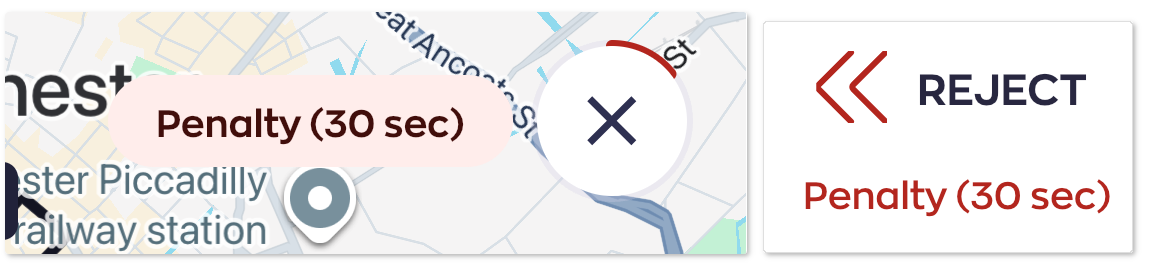
If so, a message with the penalty time will appear next to the 'X' button, or underneath the 'Reject' text.
If so, a message with the penalty time will appear next to the 'X' button, or underneath the 'Reject' text.
Frequently Asked Questions
Why have I received a penalty for rejecting a job?
There may be several reasons you have received a penalty for rejecting a job. This can include, but is not limited to, the following reasons:
- You've reached the booking reject limit.
- Job offer was an account booking.
- You were the requested/preferred driver or vehicle.
How do I change the job offer timer?
You cannot change how long the timer for accepting or rejecting a job offer is, this is set by your taxi company system. The minimum this can be set to is 5 seconds.
Our Extend Job Offer option allows you to extend the reject time for a job offer for a brief period of time, for example, if you need to leave your vehicle briefly and do not want to incur a penalty.
How do I change to a button or a swiping action for accepting and rejecting?
To change your job offer view:
- Go to the left-hand menu.
- Open up 'Settings'.
- Tap 'Job View'.
- Under Job Offer Actions, select 'Tap' or 'Swipe'.